Custom Software vs SaaS: Which One is Better?
Compare custom software and SaaS across flexibility, cost, speed, control, and long-term fit so you can choose the right platform strategy for your business.
Overview
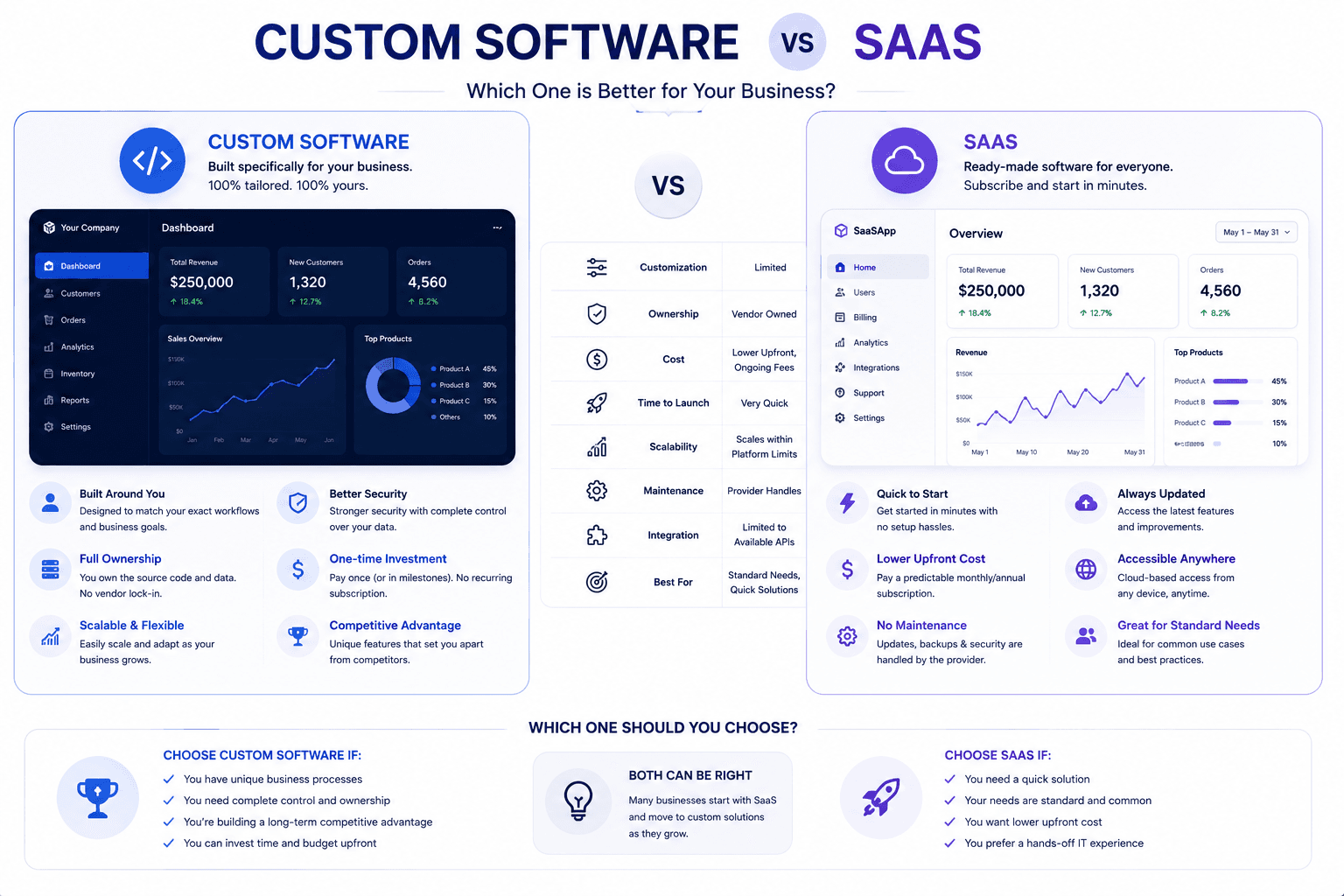
Custom software and SaaS solve different problems. SaaS gives you speed and lower upfront effort, while custom software gives you workflow fit and control when off-the-shelf tools start forcing workarounds.
Custom software is useful when existing tools force the business to work around limitations. The best systems match real workflows, roles, approvals, reporting needs, integrations, and long-term maintenance plans.
Why It Matters
Businesses often stay too long on mismatched SaaS stacks because the monthly fee feels simpler, even when hidden costs appear in manual syncing, process fragmentation, and training overhead.
Evaluate the decision against process uniqueness, integration pain, data ownership needs, and how much operational friction the current toolset is already causing.
Examples In Practice
A field-service company might start with separate SaaS tools for bookings, invoicing, and technician updates, but once dispatch and reporting become messy, a custom system can remove the double entry between tools.
A startup validating a new market may prefer SaaS first, because speed matters more than perfect fit until the team proves demand and understands the exact workflow gaps.
What A Good Decision Looks Like
The right answer is rarely the most complicated version of custom software vs saas: which one is better?. A sensible decision starts with the problem people are experiencing today, the outcome the business needs, and the constraints around budget, data, team capacity, and timing. This makes it easier to separate a useful investment from a feature that only sounds impressive in a planning meeting.
Before committing, write down what success should look like in day-to-day work. It could be quicker lead follow-up, fewer support handoffs, clearer reporting, a smoother buying journey, or less time spent correcting errors. Give that outcome an owner and a simple baseline so the team can compare the result after launch instead of relying on instinct alone.
It also helps to speak with the people who will use the system every day. They usually know which exceptions matter, where information goes missing, and which shortcuts keep work moving. Bringing that context into discovery produces a more practical solution and makes adoption much easier once the work goes live.
How To Approach It
A good implementation begins with a short discovery phase. Map the current process from the first trigger to the final outcome, including the people involved, existing tools, data quality, approval points, and the moments where work slows down. This gives the project a shared source of truth before design or development begins.
From there, shape the work into a realistic roadmap: define the smallest valuable version, design the user flow, build and test it with real scenarios, launch carefully, and improve from evidence. A phased approach protects the budget, reveals issues earlier, and avoids spending months on features that do not change the business outcome.
Keep a human review path for important decisions, especially where money, customer commitments, or sensitive information is involved. Clear ownership, useful reporting, and regular feedback after launch are what turn a one-time project into a system the team can depend on.
- Start with the business outcome before choosing tools.
- Map the current workflow, users, data, risks, and approval points.
- Build a focused version first, then improve from real usage.
- Measure speed, conversion, reliability, support load, and operational savings.
- Keep the system maintainable with clear architecture and documentation.
Where STEXRA Can Help
STEXRA often helps businesses keep SaaS where it works and build custom layers only where the process advantage justifies the investment.
STEXRA can help with Custom Software Development, SaaS Development, Software Development India, and related work such as AI workflow automation, website design, web application development, custom software development, API development, and business automation.